WPulse Player Hub
WOOGLES.IO LIVE SYNCPROCTORED MATCHESBROADCAST-READY
WPulse Gaming broadcasts proctored Scrabble duels played on Woogles.io, with live commentary, real-time game information and player cameras.
This is where players apply to play, install the WPulse extension, set up for match day, and find the schedule, fair-play rules and contacts.
Next duel & schedule
All times in West Africa Time (WAT, UTC+1). Please convert to your own time zone.
These are the official match settings and override any general description on this page. Check your Woogles game settings against them before play begins.
Apply to play
Scrabble players of all levels are welcome. Selection depends on the match being arranged and your availability.
To apply, message the organizer by email or Discord (see Contact) with:
- your name or preferred display name
- your Woogles.io username
- your availability and time zone
- your published rating or approximate playing level, if any
A published rating isn't required for every match, and applying doesn't guarantee selection. Selected players receive the match details, rules, setup instructions, and camera and recording conditions before confirming. You must complete the setup checks and get approval before playing.
Install the extension
Follow the steps in order. It takes about 5 minutes.
-
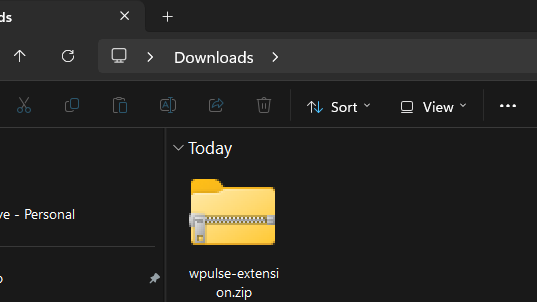
Download the extension
Download the WPulse extension (a .zip file).
Download extensionVersion: 1.2.0 · Updated: 28 Oct 2026
-
Unzip to a folder that stays in place
Right-click the zip and choose Extract All. Keep the extracted folder somewhere permanent, such as
Documents. Do not move or delete it afterwards, or the extension will stop working.The zip also contains a file called
HOW TO INSTALL.txtwith the same steps.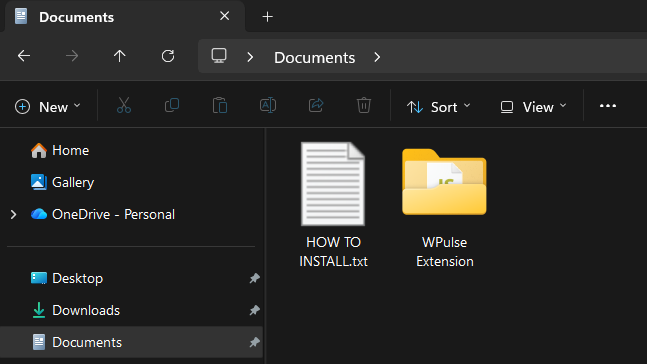
-
Load it into Chrome
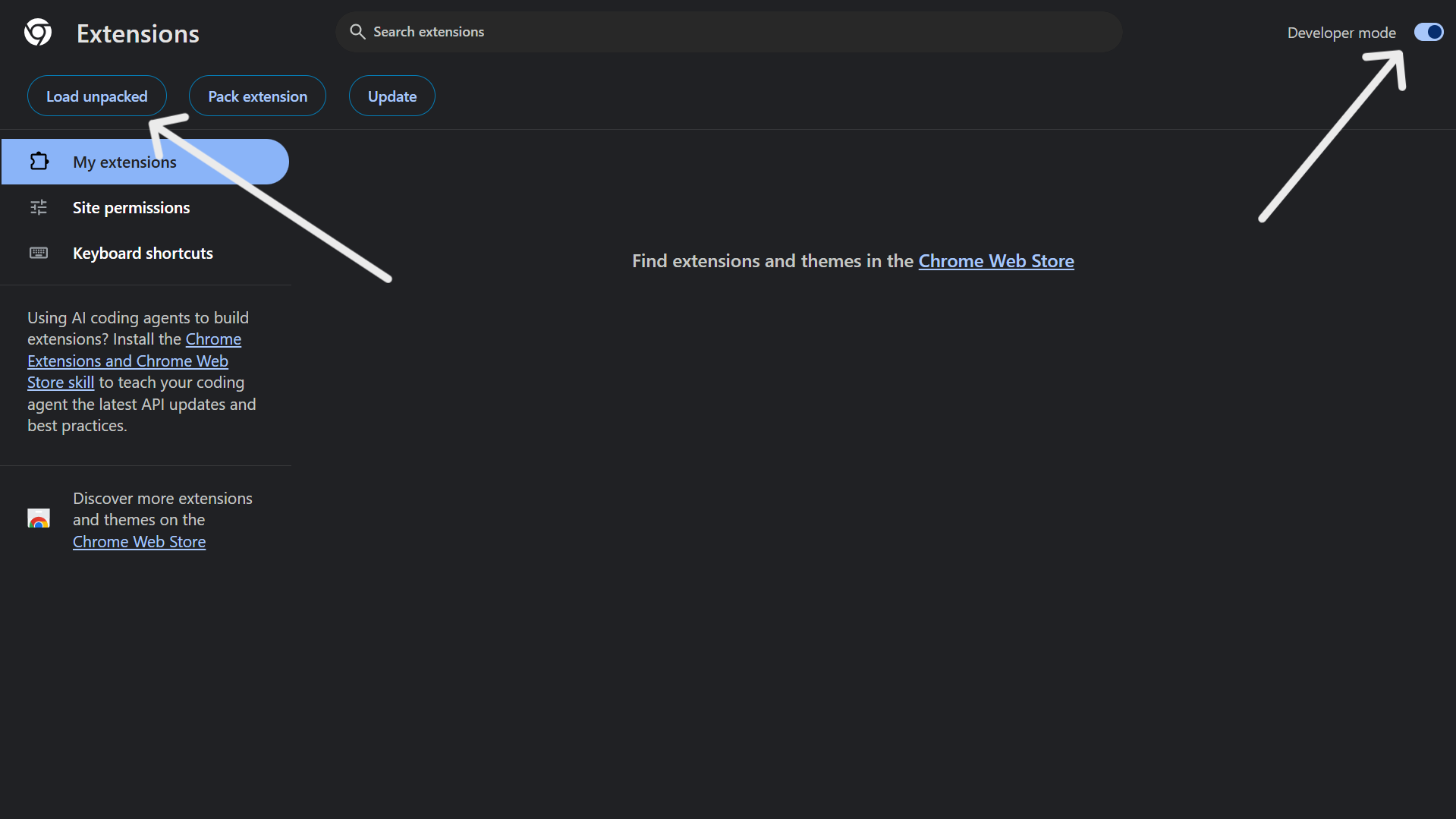
In Chrome, type
chrome://extensionsin the address bar and press Enter. Then:1. Turn on Developer mode (top right).
2. Click Load unpacked.
3. Open the extracted folder, then select the inner folder calledWPulse Extension(the one that containsmanifest.json), not the outer folder.Tip: if Chrome says "Manifest file is missing", you picked the outer folder. Go one level deeper.
-
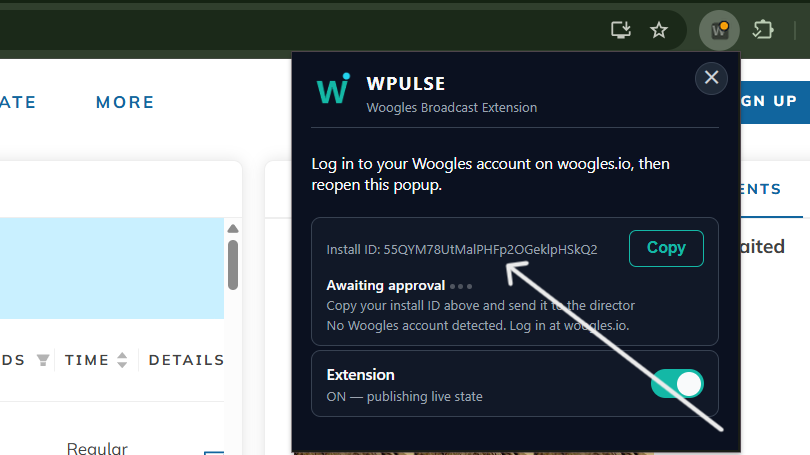
Find your install ID
Go to woogles.io, then click the WPulse icon in the Chrome toolbar. Your install ID is shown in the popup. (Tip: click the puzzle-piece icon and pin WPulse if you cannot see it.)
-
Send your install ID and wait for approval
Send your install ID directly to the organizer. You can use either of these contacts:
- Email: wpulsegaming@gmail.com
- Discord: wpulsegaming
Send these three things in one message: your install ID, your name, and your Woogles username(s).
Then wait to be approved. The organizer will confirm when you are set.
-
If Chrome shows a developer mode notice
When Chrome starts, it may show a message about disabling developer mode extensions. Dismiss it. Do not remove the extension.
-
Camera and screen-share links
You will receive your links from the organizer: one for your phone camera feed and one for your computer screen share. See Match-day setup for how to use each one.
How to update WPulse
When a new version is released, follow these steps.
-
Download the new zip
Download it from the Install the extension section of this page. Check the Version line to make sure it is newer than yours.
-
Replace the old folder
Close your Woogles tab. Delete the old extracted folder, then extract the new zip to the same place as before (the same folder location).
-
Refresh the extension
Open
chrome://extensionsand click the refresh button (the circular arrow) on the WPulse card. Do not remove the extension.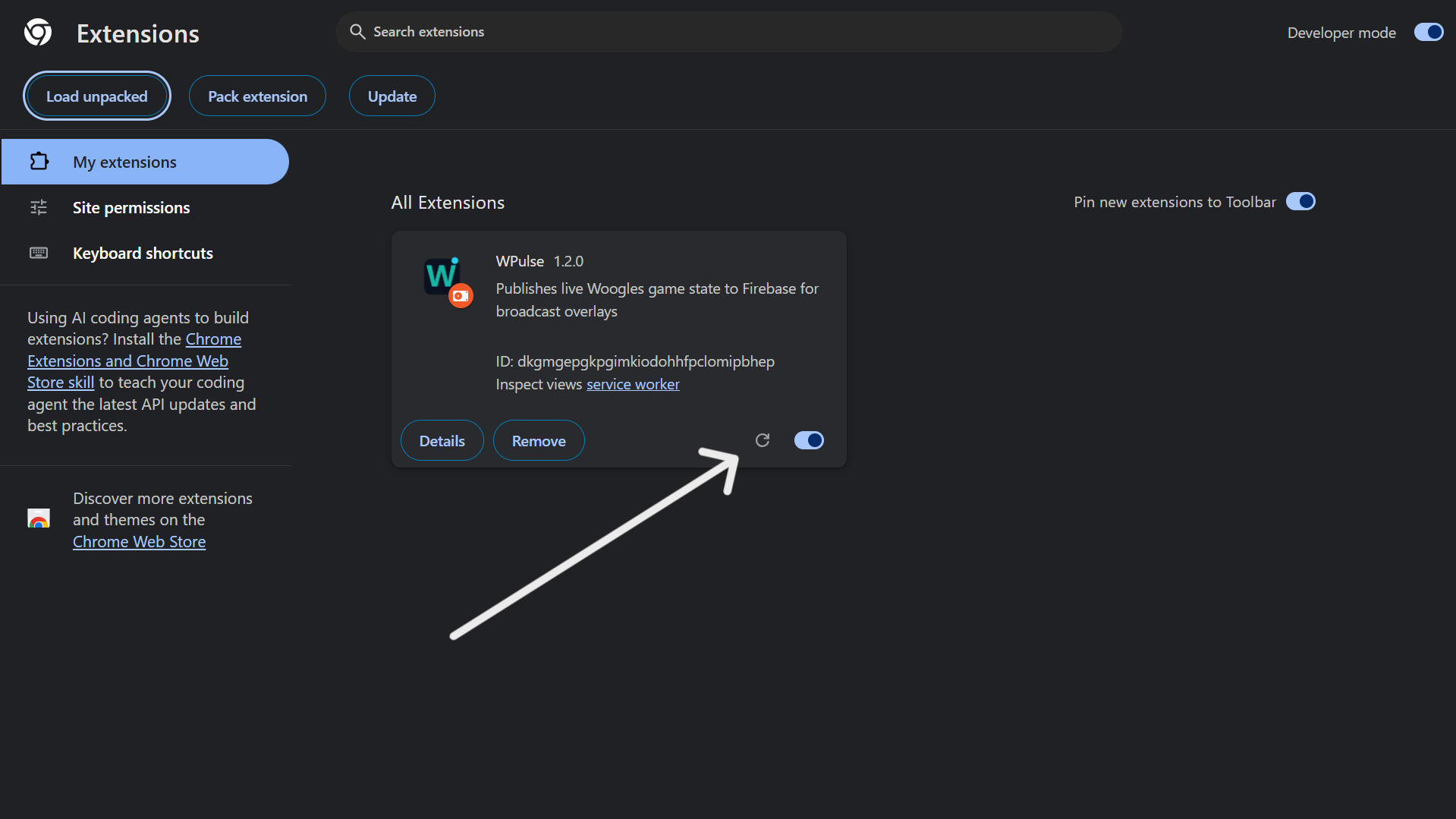
-
Reload Woogles
Reload your Woogles tab.
Your install ID stays the same, so you do not need to be approved again.
Fair play and the proctor
WPulse Duels are monitored to help maintain fair competition. Players must follow these rules, the conditions announced for their match, and the Woogles.io Terms of Service and fair-play rules.
Standard competitive matches
Standard competitive matches are engine-free. The full list of prohibited behavior is under What is not allowed, below.
What the proctor does
The proctor monitors the camera and screen feeds, checks that the announced rules are followed, and reports technical issues or possible violations to the organizer. The proctor and organizer are different people: only the organizer makes event decisions, including pauses and penalties.
What players do
Share your full screen, and your camera with audio, using the links the organizer sends you. See Match-day setup for how.
When to be ready before a duel
Players must complete the required technical checks at least 30 minutes before the scheduled stream start. If you expect to be late or experience a technical problem, contact the organizer immediately (by Discord or email, see Contact). The organizer decides whether to delay, reschedule, or proceed.
Your screen and camera links are sent to you personally by the organizer. They are not on this page.
What is not allowed
- No tabs or programs on your PC related to Scrabble or word checking (other than the Woogles game itself).
- No engines, word-finding or word-lookup tools, and no asking anyone for move assistance (unless it is an announced engine-assisted demonstration).
- No watching or listening to the stream while you play, and no using the live broadcast or another account to get help.
- No one else may assist you, and no one may be seen next to you during a game.
- No other device may be used to look up words, analyse the position, or anything else related to the game. A phone used as your camera is fine.
- No messaging or calling anyone about the game while it is in progress.
- Turn off all notifications before the match. They can appear on your shared screen.
- Keep your full screen shared and your camera on, with you in view, for the whole game.
- No headphones or earbuds.
Engine-assisted demonstrations
Engine-assisted demonstrations are separate from standard competitive matches. They must be clearly labelled, nonrated and announced in advance, must have the explicit agreement of both players, and must comply with Woogles.io's rules. Unrated does not mean engines are allowed. Unless a match is announced as an engine-assisted demonstration, the engine-free rules apply.
Disconnections and technical problems
Notify the proctor or organizer immediately. The proctor reports the issue, but only the organizer can authorize a pause. Wait for the organizer's instructions before resuming or taking further action. The organizer decides whether to resume, continue, restart, reschedule, or otherwise handle the match.
Incorrect game settings
Check the game settings against the match announcement before play begins. Report any mismatch to the organizer immediately. The organizer decides how to proceed based on the circumstances.
Allegations and penalties
If a fair-play concern is raised, the organizer reviews the available evidence, gives the player a chance to explain where appropriate, and documents the decision. An allegation alone is not proof of a violation. Any action depends on the evidence, the seriousness of the issue and the circumstances. Possible outcomes include a warning, a game or match loss, rescheduling, or disqualification, but none of these is automatic. These are WPulse event decisions; Woogles.io may apply its own rules or penalties independently.
The rules may be updated as the series develops. Players will be informed of the rules applicable to their match before they confirm participation.
Match-day setup
During a duel, the proctor watches two feeds from you: your phone camera and your computer's full screen. Set both up using the links the organizer sends you.
What you need
- A laptop or desktop computer with Google Chrome
- A phone with a working front camera
- A phone holder or tripod, and a charger
- A stable internet connection
Phone camera
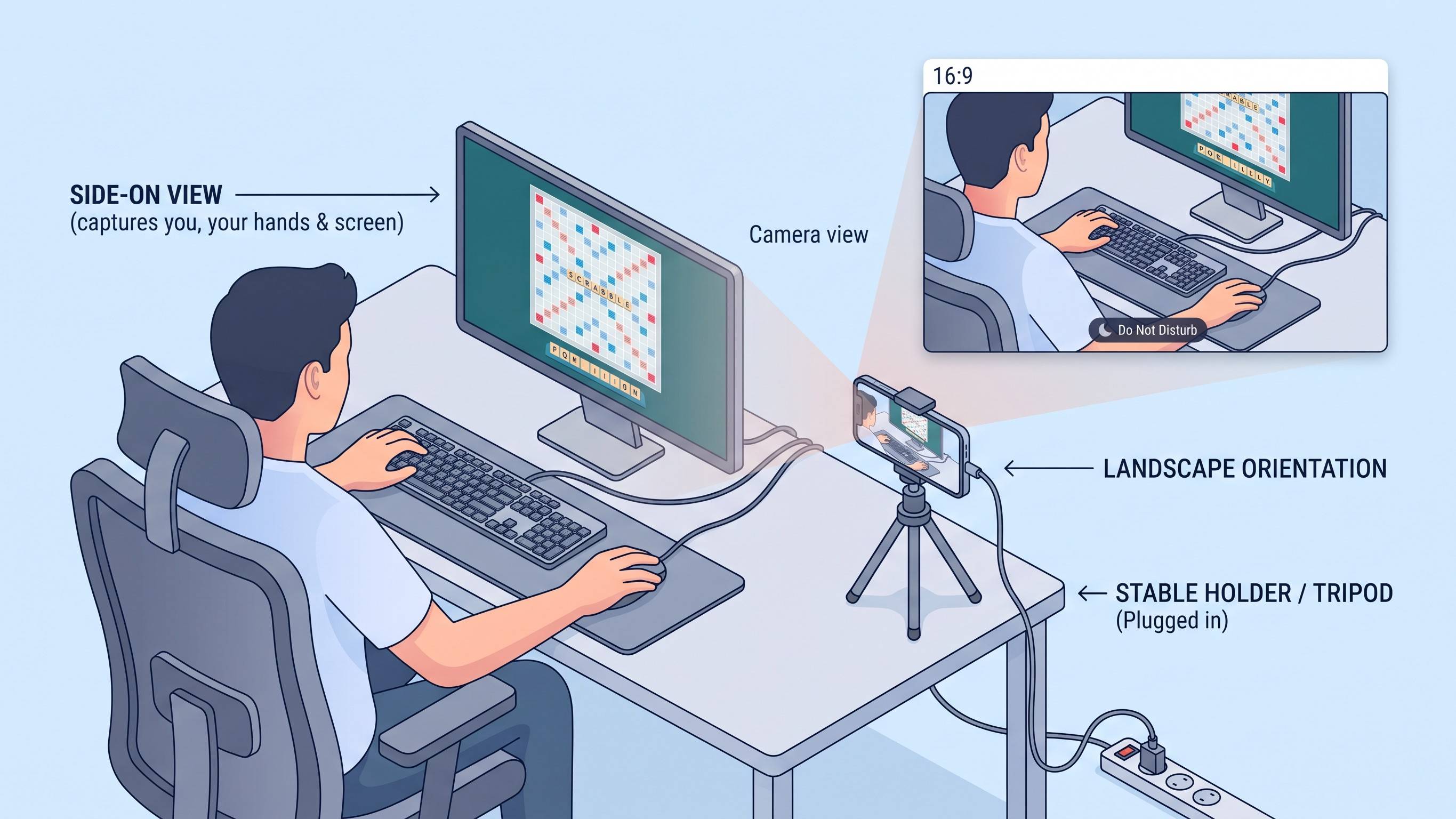
- Put your phone in landscape position on a stable holder or tripod, and plug it in.
- Place it to your side, away from your computer, so it clearly shows you, your hands and your screen.
- Switch on Do Not Disturb so notifications do not appear.
- Open your camera link on the phone. Choose the front camera and the default microphone, then start.
- Keep the browser tab open on the phone for the whole duel.
Screen share
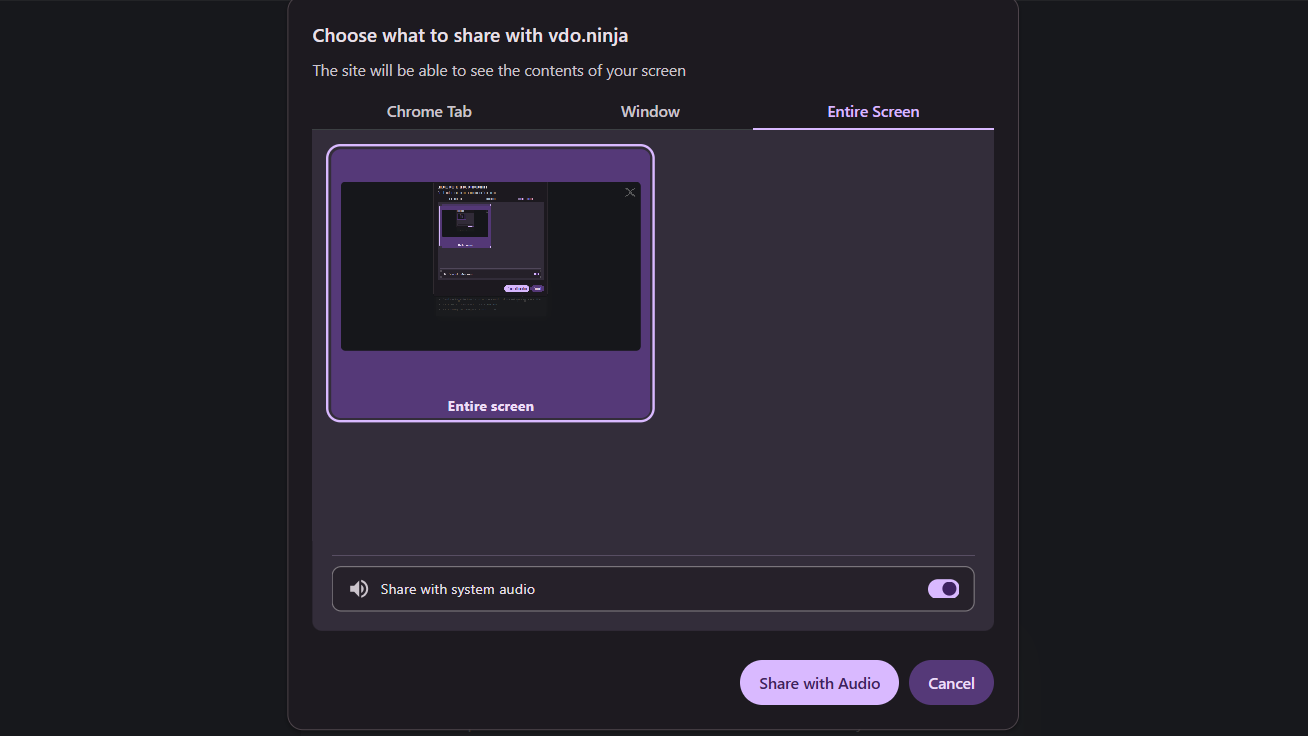
- Open your screen share link on your computer.
- Choose to share your entire screen (not a tab or a window).
- Select the screen where Woogles is running and turn on "share audio". Audio sharing is required.
- Start sharing, then minimize that window. Do not close it.
Test before your duel
- Your hands and screen are clearly visible on the phone camera.
- Your entire screen is being shared.
- Notifications are off.
- You have done this at least 30 minutes before the scheduled stream start.
Lighting and room
Play in a well-lit room so the proctor can see you clearly. No one else may be visible, and headphones and earbuds are not allowed.
Camera, screen sharing and recording
Standard competitive matches require a working player camera feed and agreement to the announced public camera and recording conditions before a player is scheduled. The organizer provides this information before asking a player to confirm. Players who refuse the public camera requirement cannot play the standard competitive format.
The organizer sends each player their camera and screen-sharing links. The proctor uses these feeds to monitor the match. Match footage will be used for YouTube livestreams and replays, short clips and highlights, and player camera feeds during broadcasts. Screen feeds are used for proctoring only and are not shown in the public broadcast.
Every WPulse match is recorded and may be reviewed if a technical issue, complaint or fair-play concern needs to be assessed. Recordings are retained indefinitely unless there is a reason to delete them, and access to raw recordings is restricted to the organizer unless another person is specifically authorized. Before confirming participation, players are told how their feeds and recordings will be used.
Published footage and removal requests
Published match footage is normally retained. To request removal or restriction of specific footage, contact the organizer (by email or Discord). Requests are reviewed case by case and removal is not guaranteed; the organizer may consider factors such as privacy, safety, legal requirements or a significant error. Raw recordings and published videos are treated separately: removing a published video does not automatically delete raw recordings or other copies. By accepting a match invitation, you confirm that you agree to the announced camera, broadcast and recording conditions. Contact the organizer before accepting if you have a question or concern.
About the stream
WPulse Gaming streams online Scrabble matches with live commentary, live game information and player cameras. Matches are played on Woogles.io under the rules announced for each event.
Format
- Format
- Matches are Best of 7, 9, 11 or 15 games (first to 4, 5, 6 or 8 wins).
- Time controls
- Rapid and blitz, between 5 and 10 minutes.
Rules
- Games
- Online Scrabble on Woogles.io, strictly CSW lexicon.
- Players
- From all over the world.
- Time zone
- All times are in West Africa Time (WAT, UTC+1).
These are general descriptions. The specific match announcement is the source of truth.
What the stream looks like
Here is what viewers see during a WPulse Duel. The overlay shows live game information supported by WPulse.
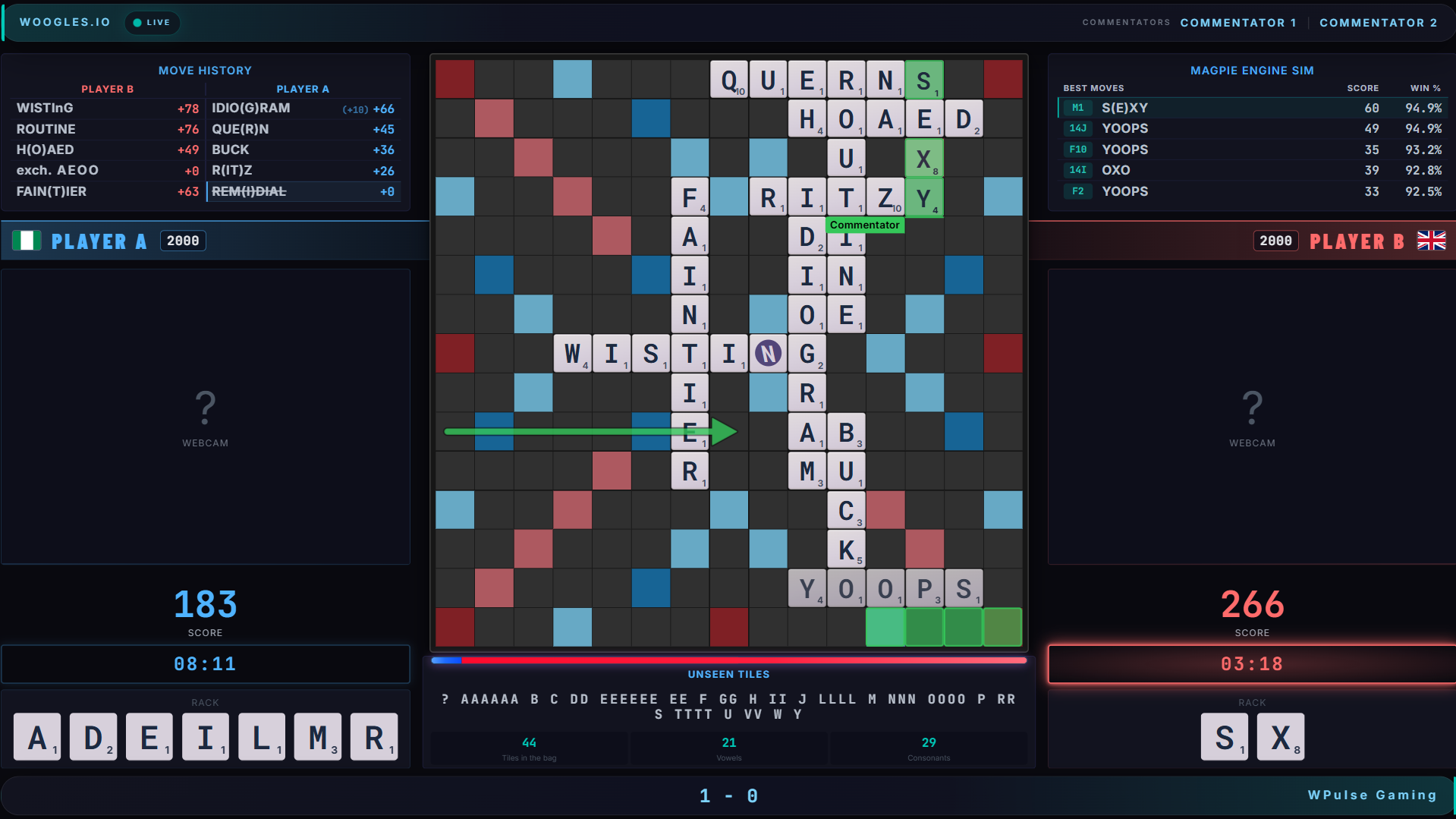
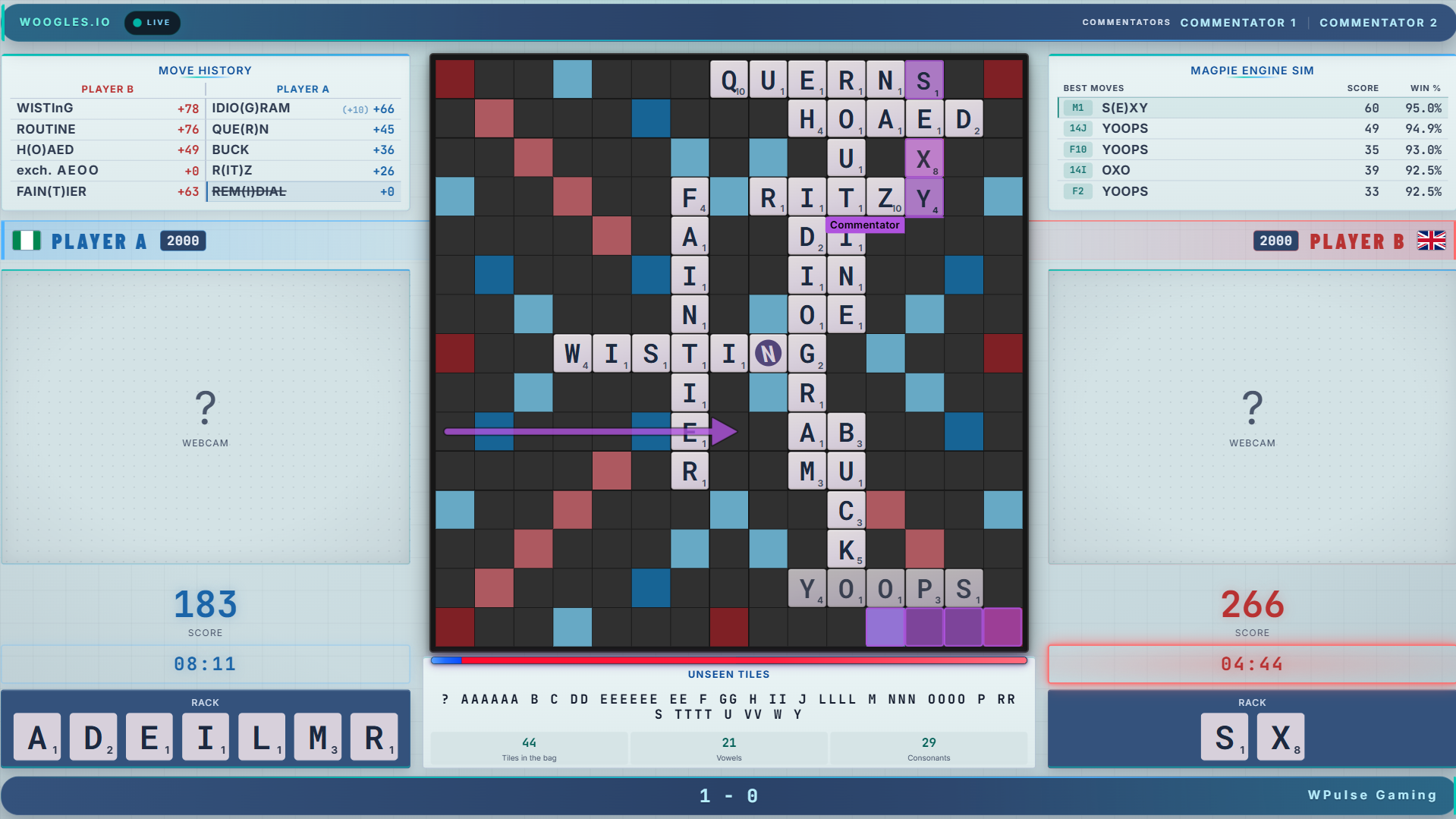
Live board
The board updates move by move, with the latest move highlighted.
Racks and unseen tiles
Both players' racks and the unseen tiles are shown to viewers.
Scores and clocks
Live scores and clocks. If a player goes into overtime, the clock keeps counting below zero and pulses amber.
Move history
Recent moves shown as the game progresses.
Engine analysis and evaluation bar
An evaluation bar, win percentages and the engine's best moves appear on stream when analysis is enabled for a broadcast.
Live commentary
Commentators draw arrows and highlights on the board to explain moves.
Game result banner
When a game ends, a banner shows the result right away: win, resignation, overtime forfeit and more.
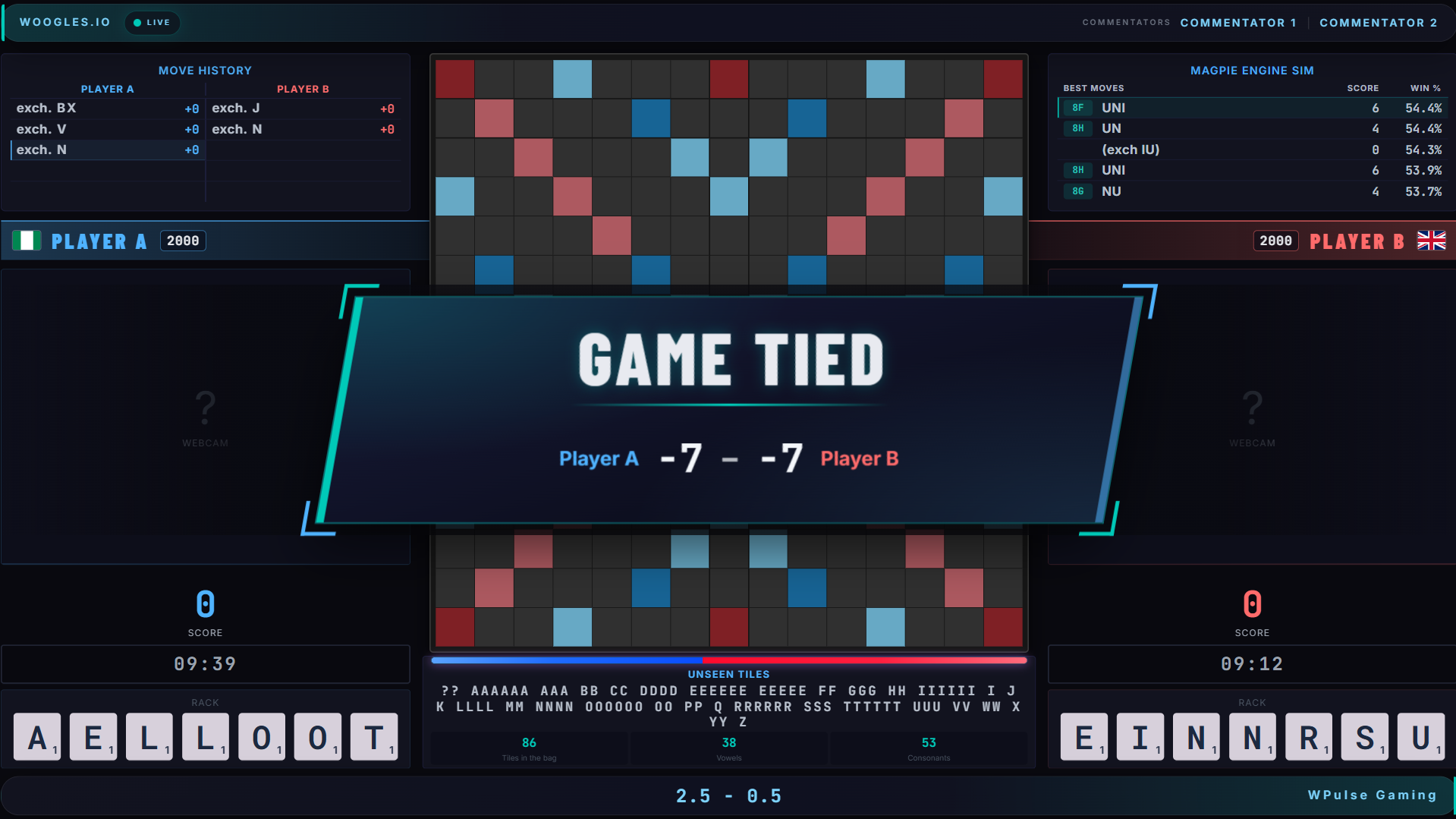
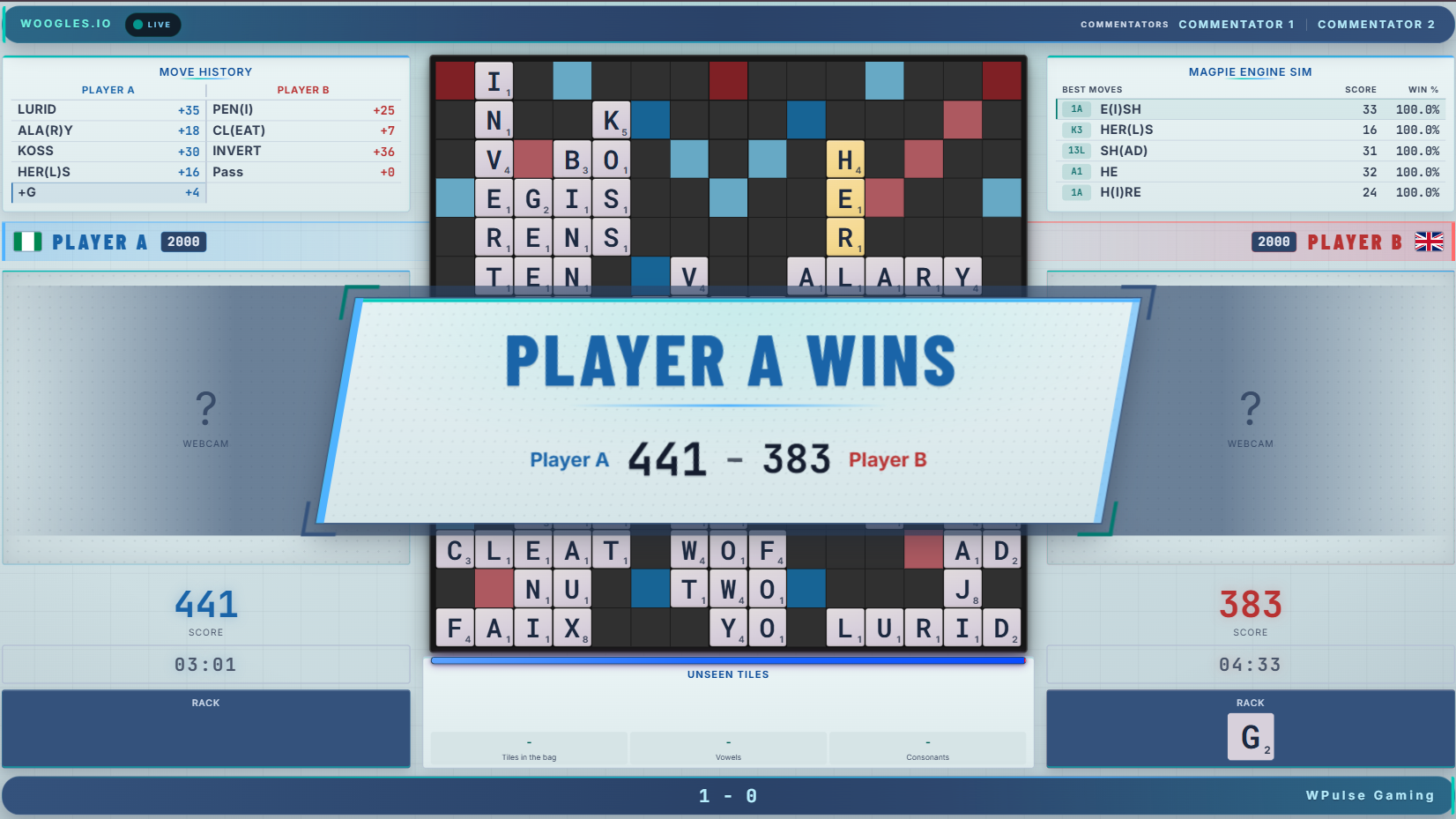
Because both racks are visible on the stream, players must not watch or listen to it during a game. See Fair play and the proctor.
FAQ & troubleshooting
What does the WPulse extension do?
It reads the game information that the Woogles page already shows (board, scores, clocks, moves and your own rack) plus your Woogles username, and sends it to the live stream overlay. It does not play or change your game, and it never asks for your Woogles password.
What do I need to take part?
A computer with Google Chrome for Woogles and the extension, a camera with a microphone (a phone works well), and a stable internet connection. See Match-day setup.
Why does Chrome show a "developer mode" notice?
The extension is installed from a file instead of the Chrome Web Store, so Chrome shows a notice when it starts. Dismiss it. Do not remove the extension.
The extension says "WPulse isn't connected to a Woogles game." What do I do?
Make sure you are on a game page at woogles.io, then reload the tab. If it still does not connect, message the organizer by email or Discord.
Do I need to be approved? How long does it take?
Yes. Send your install ID, your name and your Woogles username(s) to the organizer. Until you are approved, nothing from your install reaches the stream.
Do I need to be approved again after an update?
No. Your install ID stays the same when you update. See How to update WPulse.
Can I use an engine or word checker?
Not in standard competitive matches, which are engine-free. Engine-assisted demonstrations are separate and need advance announcement, nonrated status and both players' explicit agreement. See Fair play and the proctor.
What time will duels be, and in which time zone?
All times on this page are in West Africa Time (WAT, UTC+1). See Next duel & schedule.
Who can see my screen and camera?
The proctor and organizer watch your camera and screen feeds. Your camera feed is used in the public broadcast, and match footage in replays, short clips and highlights. Your screen is used for proctoring only and is never shown in the public broadcast. See Camera, screen sharing and recording.
Can I play if I do not have a published rating?
Possibly. It depends on the match being arranged. Include your approximate playing level and experience when applying if you do not have a published rating.
Can I decline the public camera requirement?
The public camera is required for standard competitive matches. If you refuse it, you cannot play that format. Contact the organizer by email or Discord before accepting an invitation if you have a question or concern.
Can I ask for a published video to be removed?
Yes. Contact the organizer by email or Discord. Published footage is normally retained; requests are reviewed case by case and removal is not guaranteed. See Camera, screen sharing and recording.
Who can authorize a stop or restart if a player disconnects?
Only the organizer can authorize a pause. Notify the proctor or organizer immediately and wait for the organizer's instructions. See Fair play and the proctor.
What if the Woogles settings are different from the match announcement?
Report the mismatch to the organizer immediately. The organizer decides how to proceed, so do not assume the game may continue until the organizer confirms it. See Fair play and the proctor.
What happens if someone is accused of cheating?
The organizer reviews the available evidence, hears the player's explanation where appropriate, and documents the decision. See Fair play and the proctor.
Still stuck? Contact the organizer using the details in the Contact section.